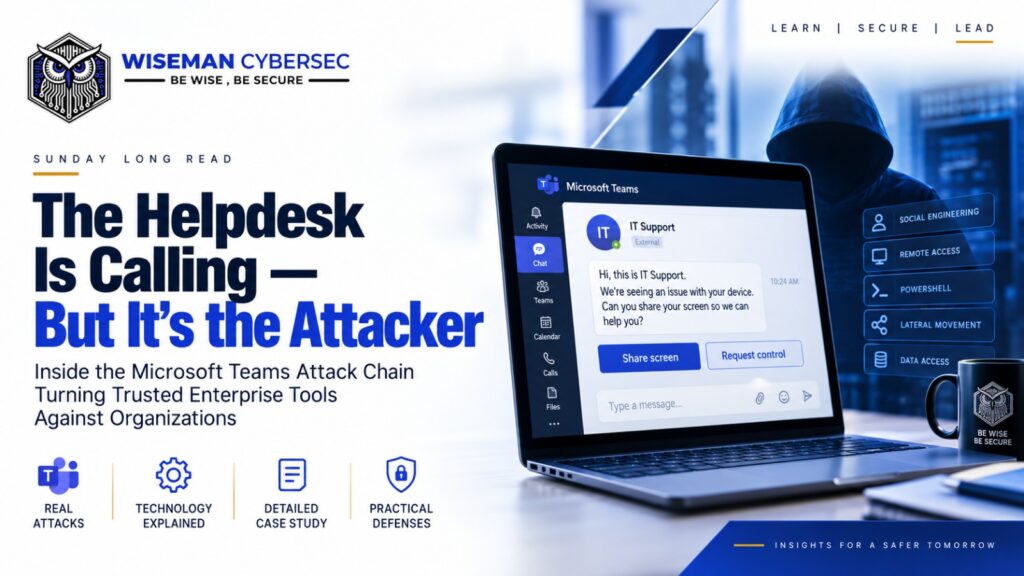
Inside the Microsoft Teams Attack Chain Turning Trusted Enterprise Tools Against Organizations
Imagine this.
You are working on your laptop when a Microsoft Teams message appears.
The person identifies themselves as IT support.
Maybe there is an issue with your device. Maybe they tell you an update needs to be installed. Maybe they ask you to share your screen and approve remote control so they can fix it.
Nothing about this immediately looks like malware.
There is no suspicious attachment.
No obviously fake login page.
No strange executable sitting in your inbox.
The employee voluntarily starts a legitimate remote-support session.
And that can be enough.
Microsoft Threat Intelligence recently disclosed an active human-operated intrusion campaign where attackers impersonated IT/helpdesk personnel through Microsoft Teams, convinced users to grant remote access, and then moved from one employee endpoint toward enterprise infrastructure.
What makes this campaign particularly important is not the discovery of some revolutionary malware.
It is almost the opposite.
The attackers relied heavily on technology organizations already trust:
- Microsoft Teams.
- Remote-support software.
- PowerShell.
- Windows Installer.
- Node.js.
- Active Directory.
- WinRM.
The tools were legitimate.
The workflow looked legitimate.
The intent was not.
And that may be one of the most important cybersecurity lessons of 2026.
This Was Not an Isolated Signal
Several security developments this week tell a similar story.
On September 3, attackers were reported to have compromised infrastructure supporting Coder’s module registry, inserting unauthorized servers that distributed modified Terraform modules containing credential-stealing code. The malicious modules sought cloud credentials, CI/CD secrets, OIDC tokens, SSH keys and other sensitive information.
On September 4, Google patched CVE-2026-85046, an actively exploited Chrome V8 type-confusion vulnerability. A malicious webpage could potentially trigger memory corruption and enable code execution inside Chrome’s renderer process.
And Palo Alto Networks Unit 42 documented an enterprise intrusion where an attacker used frontier AI agents to compress activity involving more than 50 MITRE ATT&CK techniques into less than ten hours — including reconnaissance, secrets harvesting, privilege takeover, CI/CD abuse and cloud infrastructure compromise.
Different incidents.
Different technologies.
But a common lesson:
Modern attacks increasingly exploit the trust relationships between users, software, identities, development infrastructure and administrative tools.
The Microsoft Teams campaign demonstrates this particularly well.
Case Study: When “Hi, This Is IT Support” Becomes Initial Access
Microsoft observed attackers operating through external Teams tenants while impersonating internal IT or helpdesk personnel.
The objective was deceptively simple:
Convince the employee to hand over interactive control of their machine.
The victim might approve a Teams “request control” prompt during screen sharing or open a legitimate remote-support application such as Quick Assist and provide the connection code.
At that point, the attacker has accomplished something extremely valuable.
They haven’t necessarily stolen the employee’s password.
They haven’t necessarily exploited Windows.
They have convinced an authenticated employee to provide them access to an authenticated computer.
That distinction matters.
The attack chain then becomes much more technical.
Stage 1 — Microsoft Teams Becomes the Phishing Channel
Most security-awareness programmes still teach employees to inspect emails.
Check the sender.
Don’t open unknown attachments.
Hover over suspicious links.
But enterprise communication has moved far beyond email.
Teams, Slack, Zoom, WhatsApp and other collaboration platforms have become trusted business environments.
Attackers understand this.
In Microsoft’s observed campaign, an attacker from an external Teams tenant initiated a conversation while pretending to be company IT staff.
Teams itself had not been technically compromised.
Microsoft specifically notes that the attack depended on social engineering users into overriding or accepting security warnings associated with external communication.
That creates an important distinction:
Phishing is no longer an email problem.
It is a trust-channel problem.
Wherever employees communicate, attackers can attempt to manufacture trust.
Stage 2 — Legitimate Remote Support Becomes Initial Access
Once the employee accepts the request, the attacker convinces them to begin a remote-support session.
From the employee’s perspective, this may look perfectly normal.
IT support teams legitimately use remote-management software every day.
But now the attacker effectively has interactive access to the employee’s workstation.
This changes the security equation dramatically.
The attacker can operate inside a legitimate user session, on a legitimate corporate device, using the victim’s existing network connectivity.
Microsoft describes this as credential-backed interactive access.
The attacker has crossed the perimeter without necessarily defeating the authentication system.
The user effectively opened the door.
Stage 3 — PowerShell + MSI: Living Inside Trusted Windows Tools
During the remote session, Microsoft observed attackers using PowerShell to download a malicious MSI package from cloud infrastructure.
The MSI was then silently installed using msiexec.
The filenames were designed to reinforce the IT-support story, including names resembling updates or hotfixes.
This is where another important cybersecurity concept appears:
Living off the Land
Instead of deploying an obvious collection of attacker-created executables, adversaries increasingly abuse utilities already present or trusted inside enterprise environments.
PowerShell is legitimate.
msiexec is legitimate.
cmd.exe is legitimate.
WScript is legitimate.
rundll32 is legitimate.
WinRM is legitimate.
Attackers simply change what those tools are being asked to do.
Security therefore cannot be based only on:
“Is this executable trusted?”
The more useful question becomes:
“Is this trusted executable behaving normally in this context?”
Stage 4 — Why Attackers Used Node.js
Here the intrusion becomes particularly interesting.
The malicious MSI obtained a legitimate portable Node.js runtime.
Node.js is widely used to execute JavaScript outside a web browser.
Developers use it every day.
Enterprise applications depend on it.
It is not inherently malicious.
And that is exactly why it is useful to an attacker.
Microsoft found that the attack chain used the legitimate Node.js environment to execute an encrypted JavaScript implant from a user-writable directory.
If Node.js was not present, the malware could obtain the legitimate portable runtime from the official Node.js distribution.
The result:
Trusted binary + malicious JavaScript = attacker-controlled execution environment.
The attacker avoids relying entirely on an obviously custom malware executable that endpoint products may recognize immediately.
This technique highlights the difference between signature-based security and behaviour-based security.
A signed Node.js binary might be completely legitimate.
But:
Node.js executing an encrypted loader from LocalAppData after an unsolicited Teams remote-support session is not normal enterprise behaviour.
Context becomes the detection signal.
Stage 5 — Establishing Persistence
Getting access once is valuable.
Keeping access after the employee disconnects is far more valuable.
Microsoft observed persistence mechanisms including:
- HKCU Run registry entries
- Startup-folder shortcuts
- update-themed names such as EdgeUpdate
These mechanisms relaunched the Node.js-based implant when the employee logged in again.
Now the attack is no longer dependent on the original remote-support session.
The attacker has established a persistent foothold.
Stage 6 — Command and Control
Once running, the implant communicated with attacker-controlled infrastructure using randomized HTTPS polling.
The C2 server could return JavaScript instructions that the implant dynamically executed.
Observed capabilities included:
- host reconnaissance
- hardware discovery
- antivirus identification
- virtualization checks
- command execution
- screen capture
Microsoft also discovered dormant functionality capable of querying an Ethereum smart contract for an updated command-and-control URL, although that capability was disabled in the samples analyzed.
This introduces another trend defenders should watch closely.
Attack infrastructure does not always live on obvious attacker-controlled servers anymore.
Attackers increasingly experiment with legitimate cloud infrastructure, content platforms, public services and decentralized technologies to make malicious communications harder to classify purely by destination.
Stage 7 — Active Directory Reconnaissance
Once an attacker gains endpoint access, one of the most important questions becomes:
What environment have I entered?
That means discovering:
Who are the users?
Which systems exist?
Where are the servers?
Which accounts appear privileged?
Where are the domain controllers?
What identity infrastructure exists?
Microsoft observed the attacker enumerating the Active Directory environment using native commands and ADSI queries.
This allowed the operator to build a map of domain users, servers and other systems.
This stage should concern every enterprise security team.
Because once Active Directory begins getting mapped, the compromise is no longer simply about one laptop.
The attacker is looking for the path from:
User → Endpoint → Identity → Infrastructure.
Stage 8 — WinRM and Lateral Movement
Microsoft then observed the attacker using Windows Remote Management — WinRM over TCP port 5985 to reach additional domain-joined systems.
Targets included:
- File servers
- Database servers
- Application servers
- Domain controllers
- Certificate authorities
This is where a local compromise can turn into an enterprise incident.
WinRM is an administrative technology designed for legitimate remote management.
System administrators use it.
Automation platforms use it.
PowerShell remoting uses it.
But once an attacker possesses sufficient credentials and network access, the same technology becomes a lateral-movement mechanism.
Again:
The technology didn’t change.
Who controlled it changed.
Why Target Domain Controllers?
Active Directory is effectively the identity control plane for many enterprises.
Compromise the right AD privileges and an attacker may gain enormous influence over:
- user accounts
- service accounts
- authentication
- access policies
- servers
- privileged groups
- enterprise applications
This is why identity infrastructure appears repeatedly in serious intrusion chains.
Attackers do not necessarily need to compromise every server individually.
They want control over the system that determines who is trusted by those servers.
And Why Certificate Authorities?
Microsoft’s observation that the attacker probed toward certificate-authority infrastructure deserves particular attention.
Enterprise certificate authorities are part of the organization’s Public Key Infrastructure — PKI.
They issue certificates used to establish trust between:
Users.
Devices.
Applications.
Servers.
Services.
Networks.
And identities.
If improperly secured, compromised certificate infrastructure can create extremely powerful attack opportunities because certificates themselves can function as authentication credentials.
This is one reason Active Directory Certificate Services should never be treated as merely an administrative certificate-management server.
It is part of the enterprise trust architecture.
The Bigger Security Lesson: Trust Has Become the Attack Surface
Look again at this attack chain.
Microsoft Teams
↓
Remote Support
↓
PowerShell
↓
MSI / msiexec
↓
Node.js
↓
JavaScript Implant
↓
Active Directory Discovery
↓
WinRM
↓
Domain Controllers / Certificate Authorities
Almost every major component is legitimate technology.
That is precisely what makes this intrusion model so interesting.
Traditional cybersecurity thinking often asks:
What malicious software entered our environment?
Modern defenders increasingly need to ask:
Which legitimate trust relationships are behaving maliciously?
Why MFA Alone Cannot Solve This
MFA remains extremely important.
But notice something about this particular attack.
The attacker can obtain access because the legitimate employee is already authenticated.
The attacker is effectively borrowing that trusted context by controlling the user’s endpoint.
This does not make MFA ineffective.
It means MFA must be part of a larger architecture including:
- device trust
- Conditional Access
- privileged-access controls
- endpoint detection
- session monitoring
- segmentation
- behavioural analytics
Identity security is not simply proving who logged in.
It is continuously evaluating what that identity is doing after login.
Security Awareness Must Also Change
One lesson for organizations is immediate:
Employees need to stop treating collaboration-platform messages as inherently trusted.
A modern awareness programme should teach:
“I received a Teams message from IT” is not verification.
The employee should independently confirm unexpected support requests through a known internal process.
That could mean:
Calling the published helpdesk extension.
Opening an internal service ticket.
Contacting the support team through an approved internal portal.
Not simply trusting the person already communicating with them.
What Organizations Should Do Now
1. Restrict External Collaboration
Review Microsoft Teams external-access policies.
External collaboration should exist because the business needs it — not simply because it is enabled by default.
2. Establish a Verifiable Helpdesk Process
Employees should know exactly how legitimate IT support initiates remote sessions.
Unexpected support requests should require independent verification.
3. Control Remote Management Software
Organizations should maintain visibility into approved RMM tools and detect unauthorized remote-support sessions.
4. Monitor Script Interpreters
PowerShell, WScript, cmd and similar interpreters deserve behaviour-based monitoring.
Blocking them completely is rarely practical.
Watching how they are used is essential.
5. Detect Unusual Runtime Behaviour
Node.js running from LocalAppData, particularly when launching unusual or encrypted scripts, should trigger investigation.
6. Restrict WinRM
WinRM access should be limited to systems and administrative paths that genuinely require it.
Microsoft specifically recommends restricting WinRM and alerting when it originates from unexpected user contexts.
7. Protect Active Directory as Tier-0 Infrastructure
Domain controllers, privileged identities and authentication systems should operate under stronger controls than ordinary systems.
8. Protect Enterprise PKI the Same Way
Certificate authorities and issuing infrastructure should receive Tier-0-level protection.
9. Use Phishing-Resistant Authentication
FIDO2/passkeys and other phishing-resistant authentication methods reduce many credential-based attack paths.
But authentication must still be combined with device and session security.
10. Build Behavioural Detection
Security teams need detections that connect events across systems:
External Teams contact → Remote session → PowerShell → MSI execution → Node.js from LocalAppData → AD enumeration → WinRM connections
Individually, several of those events may look harmless.
Together, they describe an intrusion.
Five Questions Every Security Leader Should Ask
1. Can an external Teams user contact our employees while pretending to be IT?
2. How would our SOC know if an employee suddenly granted remote access to an unknown operator?
3. Can Node.js, PowerShell or other trusted interpreters execute unrestricted code from user-writable directories?
4. Which systems inside our environment can initiate WinRM connections to domain controllers or certificate authorities?
5. If one employee workstation were compromised today, how far could that identity travel before our controls stopped it?
The answers reveal far more about security maturity than the number of security products deployed.
Why This Matters
Cybersecurity is moving away from a simple battle between:
good software and malware.
The harder challenge is increasingly:
legitimate technology being used for illegitimate purposes.
Attackers are learning to operate through the same platforms employees and administrators use every day.
Collaboration systems.
Identity platforms.
Remote-support software.
Cloud infrastructure.
Development pipelines.
Scripting environments.
Administrative protocols.
And even AI.
That changes how organizations need to defend themselves.
Security controls must understand not only what technology is being used, but also:
Who initiated it?
From where?
Why?
Under which identity?
Against which resource?
And is that behaviour expected?
Final Thought
The most dangerous attack may not begin with malware.
It might begin with:
“Hi, this is IT support.”
The employee sees Microsoft Teams.
The operating system sees legitimate administrative tools.
The network sees authenticated traffic.
The endpoint sees signed binaries.
Everything appears trusted.
Until that trust is connected together into an attack chain.
And that is why the modern cyber perimeter is increasingly defined not by where your firewall sits —
but by where your organization places trust.