Every time you open a secure website, connect to a corporate VPN, sign a document digitally, authenticate a device, or establish an encrypted connection between systems, there is a good chance Public Key Infrastructure (PKI) is working behind the scenes.
PKI is one of the foundational technologies behind digital trust. It allows organizations to answer three critical questions:
- Who are you?
- Can I trust you?
- Can we communicate securely?
PKI combines public-key cryptography, digital certificates, Certificate Authorities (CAs), policies, validation mechanisms, and certificate lifecycle processes to establish trusted identities for users, devices, applications, servers, and services.
But understanding PKI requires more than knowing what a digital certificate is.
You need to understand how certificates are issued, why browsers trust certain Certificate Authorities, how certificate chains work, and what happens when a certificate needs to be revoked.
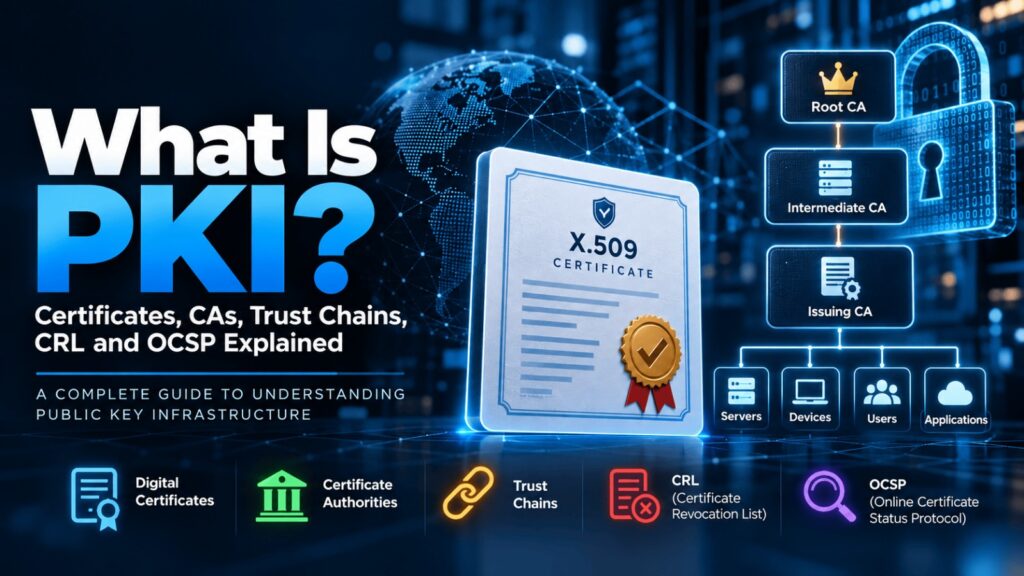
This guide explains the complete PKI ecosystem, including X.509 certificates, Root and Intermediate CAs, trust chains, CRLs, OCSP, certificate validation, and certificate lifecycle management.
What Is PKI?
Public Key Infrastructure (PKI) is a framework of technologies, processes, policies, hardware, software, and trusted entities used to create, manage, distribute, validate, and revoke digital certificates.
At the heart of PKI is asymmetric cryptography.
Instead of using a single secret key, asymmetric cryptography uses a mathematically related pair of keys:
Public Key
The public key can be distributed openly and is commonly included inside a digital certificate.
Private Key
The private key must remain secret and is controlled by the certificate owner.
Depending on the protocol and use case, these keys can support authentication, digital signatures, key establishment, and other cryptographic operations.
PKI provides the trust framework that connects a public key to a verified identity.
Why Do We Need PKI?
Imagine visiting your bank’s website.
Your browser establishes an HTTPS connection, but how does it know that the server claiming to be your bank actually belongs to your bank?
An attacker could theoretically create another server and claim the same identity.
PKI helps solve this trust problem.
The website presents a digital certificate containing information about its identity and public key. Your browser validates that certificate against trusted Certificate Authorities and checks several conditions before trusting the connection.
When validation succeeds, the browser can establish a secure TLS session with greater confidence that it is communicating with the intended service.
PKI therefore supports several important security objectives:
Authentication — establishing the identity of a system, user, application, or device.
Integrity — helping detect unauthorized modification of signed information.
Confidentiality — supporting secure protocols that protect information from unauthorized disclosure.
Digital signatures — allowing entities to cryptographically sign data.
Trust — creating a scalable mechanism for deciding which digital identities should be trusted.
Core Components of PKI
A PKI environment typically contains several interconnected components.
| Component | Purpose |
| Certificate Authority | Issues and signs digital certificates |
| Registration Authority | Helps verify identities before certificate issuance |
| Digital Certificate | Binds an identity to a public key |
| Public Key | Shared cryptographic key associated with the identity |
| Private Key | Secret cryptographic key controlled by the certificate owner |
| Root CA | Highest trust anchor in a PKI hierarchy |
| Intermediate CA | Issues certificates beneath the Root CA |
| CRL | Publishes certificates that have been revoked |
| OCSP | Provides certificate revocation status responses |
| Certificate Repository | Stores or distributes certificates and related information |
| Policies & Procedures | Define how certificates are issued, managed and trusted |
Understanding how these components interact is the key to understanding PKI.
What Is a Digital Certificate?
A digital certificate is an electronic credential used to associate a public key with an identity.
Most PKI environments use certificates based on the X.509 standard.
A certificate may identify:
- A website
- A server
- A person
- An employee
- A laptop
- A mobile device
- An IoT device
- An application
- An API or service
- A machine or workload
A certificate essentially says:
This public key belongs to this identified entity, according to the authority that issued and signed this certificate.
What Information Does an X.509 Certificate Contain?
An X.509 certificate commonly contains information such as:
Subject
Identifies the entity associated with the certificate.
Issuer
Identifies the Certificate Authority that issued the certificate.
Serial Number
A unique identifier assigned by the issuing CA.
Public Key
The public key belonging to the certificate holder.
Validity Period
Defines when the certificate becomes valid and when it expires.
Signature Algorithm
Identifies the algorithm used by the issuer to sign the certificate.
Digital Signature
The CA’s cryptographic signature over the certificate.
Extensions
Certificates can contain additional information such as:
- Subject Alternative Name (SAN)
- Key Usage
- Extended Key Usage
- Basic Constraints
- Authority Key Identifier
- Subject Key Identifier
- CRL Distribution Points
- Authority Information Access
These extensions help systems determine how a certificate should be used and validated.
Public Key vs Private Key
One of the most important PKI concepts is understanding the difference between the two keys.
| Public Key | Private Key |
| Can be distributed | Must remain secret |
| Included in certificates | Protected by the certificate owner |
| Used in public-key cryptographic operations | Used in corresponding private-key operations |
| Sharing it is expected | Exposure can compromise identity/security |
The security of PKI heavily depends on protecting private keys.
If an attacker obtains a private key, they may be able to impersonate the certificate owner or create fraudulent signatures, depending on how that key is authorized to be used.
For high-value keys, organizations may therefore use Hardware Security Modules (HSMs) or other hardware-backed key protection mechanisms.
What Is a Certificate Authority?
A Certificate Authority (CA) is a trusted entity responsible for issuing and digitally signing certificates.
The CA verifies identity according to defined policies before issuing a certificate.
By signing the certificate, the CA effectively states:
According to our validation process, this public key belongs to this identity.
Examples of certificates issued by CAs include:
- TLS/SSL certificates
- Employee authentication certificates
- Device certificates
- Code-signing certificates
- Email certificates
- Client authentication certificates
Organizations can use publicly trusted CAs as well as their own private enterprise PKI.
Root CA vs Intermediate CA
PKI generally uses a hierarchy rather than having one CA issue every certificate directly.
A common structure looks like this:
Root CA
↓
Intermediate CA
↓
Issuing CA
↓
Server / User / Device Certificate
The hierarchy improves scalability and security.
Root Certificate Authority
The Root CA sits at the top of the certificate hierarchy.
Its certificate is generally self-signed and acts as a trust anchor.
Because compromising the Root CA could compromise trust across the PKI hierarchy, organizations normally protect Root CA private keys extremely carefully.
A Root CA may therefore be:
- Kept offline
- Stored inside an HSM
- Used only when necessary
- Physically protected
- Subject to strict administrative controls
The Root CA normally signs certificates for subordinate or Intermediate CAs instead of issuing thousands of end-entity certificates directly.
Intermediate Certificate Authority
An Intermediate CA operates underneath the Root CA.
The Root CA signs the Intermediate CA’s certificate.
The Intermediate CA can then issue certificates itself or sign certificates for additional subordinate CAs.
This creates separation between the highly protected Root CA and everyday certificate operations.
If an Intermediate CA is compromised, organizations can revoke that Intermediate CA without necessarily replacing the Root CA trust anchor.
What Is a Certificate Trust Chain?
A certificate trust chain, also called a certificate chain or chain of trust, connects an end-entity certificate to a trusted Root CA.
For example:
Website Certificate
↓
Issued by
Intermediate CA
↓
Issued by
Root CA
If the client already trusts the Root CA and can successfully validate the chain and applicable certificate constraints, it can establish trust in the website certificate.
How Certificate Chain Validation Works
Suppose you visit:
The web server presents its certificate and usually the necessary intermediate certificate or certificates.
Your browser performs several checks.
1. Check the certificate identity
For TLS server authentication, the browser checks whether the requested hostname matches an identity permitted by the certificate, typically through the Subject Alternative Name extension.
2. Check certificate validity
The browser verifies whether the certificate is currently within its permitted validity period.
3. Verify certificate signatures
The browser verifies that certificates in the chain were cryptographically signed by their respective issuers.
4. Build the certificate chain
The browser attempts to construct a valid path:
Server Certificate → Intermediate CA → Trusted Root CA
5. Evaluate certificate constraints
It evaluates relevant extensions, policies, key usage restrictions and other certificate constraints.
6. Check trust
The chain must ultimately reach a trust anchor recognized by the client.
7. Evaluate revocation where applicable
Depending on the platform, certificate type and validation policy, revocation information may also be evaluated using mechanisms such as CRLs or OCSP.
If the required checks succeed, the certificate can be accepted.
If validation fails, the browser or application may display a certificate warning or reject the connection entirely.
PKI and the TLS Handshake
PKI plays an important role in TLS.
When a client connects to an HTTPS server, the server provides its certificate as part of the TLS handshake.
At a simplified level:
Step 1: Client initiates a TLS connection.
Step 2: Server responds with handshake information and its certificate chain.
Step 3: Client validates the server certificate and chain.
Step 4: The parties complete cryptographic key establishment according to the negotiated TLS cipher suite.
Step 5: Both sides derive symmetric session keys.
Step 6: Encrypted application communication begins.
An important distinction is that the certificate itself does not simply “encrypt the entire internet session.”
Modern TLS generally uses public-key mechanisms for authentication and secure key establishment, while symmetric cryptography protects the bulk application traffic because it is significantly more efficient.
What Is a Certificate Signing Request?
Before a CA issues a certificate, the requesting system commonly generates a Certificate Signing Request (CSR).
The process typically works like this:
- A public/private key pair is generated.
- The private key remains protected by the requesting entity.
- A CSR is generated containing the public key and requested identity information.
- The CSR is sent to the CA.
- The CA validates the request according to its policies.
- The CA creates and signs the certificate.
- The certificate is returned to the requester.
The private key should not need to be sent to the CA as part of a normal CSR workflow.
Protecting that private key is critical.
The Certificate Lifecycle
Certificates are not permanent.
Every certificate goes through a lifecycle.
A typical certificate lifecycle includes:
Discovery → Request → Validation → Issuance → Deployment → Monitoring → Renewal → Revocation/Expiration → Replacement
Managing this lifecycle becomes challenging at enterprise scale.
A large organization may have certificates across:
- Web servers
- Load balancers
- Firewalls
- VPN gateways
- Kubernetes environments
- Cloud services
- APIs
- Employee devices
- Mobile devices
- IoT systems
- Internal applications
Losing track of even one important certificate can cause outages.
What Happens When a Certificate Expires?
Certificates have defined validity periods.
Once a certificate expires, clients should no longer treat it as currently valid.
An expired TLS certificate can cause:
- Browser security warnings
- API connection failures
- Application outages
- Failed authentication
- Broken integrations
- Service disruptions
This is why organizations need certificate inventory, monitoring and automated renewal processes.
What Is Certificate Revocation?
Expiration handles certificates reaching the end of their planned lifetime.
But sometimes a certificate needs to stop being trusted before it expires.
This is called certificate revocation.
A certificate might need to be revoked because:
- Its private key was compromised
- A device was stolen
- A certificate was issued incorrectly
- An employee left the organization
- The certificate should no longer be trusted
- A CA or subordinate CA was compromised
- The certificate owner’s authorization changed
PKI therefore needs mechanisms for communicating certificate status.
Two important mechanisms are:
CRL — Certificate Revocation List
and
OCSP — Online Certificate Status Protocol
What Is a Certificate Revocation List (CRL)?
A Certificate Revocation List is a digitally signed list published by a CA containing certificates that the CA has revoked.
Certificates can include a CRL Distribution Point, telling clients where relevant revocation information may be obtained.
Conceptually, the validation process looks like:
Client
↓
Downloads CRL
↓
Checks certificate serial number
↓
Determines whether the certificate appears on the revocation list
If the certificate is listed as revoked, it should not be trusted for the relevant validation.
Advantages of CRLs
CRLs have some useful characteristics.
They can be:
- Downloaded and cached
- Distributed through standard infrastructure
- Used without querying the CA for every individual certificate
- Suitable for many enterprise environments
However, CRLs also have limitations.
As the number of revoked certificates increases, CRLs can become larger.
There is also a freshness issue.
A client may be using a CRL downloaded earlier, while a certificate may have been revoked after that CRL was issued.
This is one reason online certificate status mechanisms were developed.
What Is OCSP?
Online Certificate Status Protocol (OCSP) allows a client to request status information about a specific certificate from an OCSP responder.
Instead of downloading an entire revocation list, the client effectively asks:
What is the status of this certificate?
The OCSP responder can return a status such as:
- Good
- Revoked
- Unknown
A simplified flow looks like:
Client
↓
Certificate
↓
OCSP Request
↓
OCSP Responder
↓
Certificate Status Response
This can provide more targeted status information than downloading a complete CRL.
CRL vs OCSP
Both CRL and OCSP address certificate revocation, but they work differently.
| Feature | CRL | OCSP |
| Method | Downloads a revocation list | Queries certificate status |
| Data | Multiple revoked certificates | Individual certificate status |
| Network dependency | Periodic download | Often requires online request |
| Caching | Common | Responses can also be cached |
| Privacy consideration | Less per-site query exposure | Direct queries may reveal certificate being checked |
| Infrastructure | CRL distribution point | OCSP responder |
Neither mechanism is universally perfect.
The appropriate approach depends on certificate type, application, client behavior and organizational policy.
What Is OCSP Stapling?
Traditional OCSP can introduce an additional network request.
It can also create a privacy concern because the OCSP responder may learn which certificate a client is checking.
OCSP stapling changes the flow.
Instead of every client independently contacting the OCSP responder, the server periodically obtains a signed OCSP response.
During the TLS handshake, the server can provide—or “staple”—that response to the client.
The flow becomes:
Server → OCSP Responder
Server obtains signed status response.
Then:
Client → Server
The server presents its certificate plus the relevant OCSP response during the handshake.
This can reduce additional client-side requests and improve privacy and performance in supported deployments.
CRL vs OCSP vs OCSP Stapling
| Mechanism | How It Works | Key Benefit | Main Consideration |
| CRL | Client obtains a list of revoked certificates | Cacheable and straightforward | Lists can become large or stale between updates |
| OCSP | Client asks responder about a certificate | Targeted status checking | Additional network/privacy considerations |
| OCSP Stapling | Server supplies a signed OCSP response | Reduces client-side OCSP requests | Requires server and client support/configuration |
Understanding these mechanisms is especially important for PKI engineers, security architects and administrators responsible for certificate validation.
Public PKI vs Private PKI
PKI deployments can broadly be divided into public and private PKI.
Public PKI
Public PKI uses Certificate Authorities trusted by widely deployed operating systems and browsers.
It is commonly used for:
- Public websites
- Internet-facing applications
- Public APIs
- Externally accessible services
Private PKI
Organizations can operate their own internal PKI.
Private PKI is commonly used for:
- Employee authentication
- Corporate Wi-Fi
- VPN authentication
- Internal web applications
- Machine identities
- IoT devices
- Servers
- Internal APIs
- Device management
- Service-to-service authentication
The organization’s own systems are configured to trust its private Root CA.
Common Enterprise PKI Use Cases
PKI extends far beyond HTTPS websites.
1. TLS Certificates
Certificates authenticate servers and support secure HTTPS communication.
2. VPN Authentication
Organizations can use client certificates to authenticate users or devices connecting to VPN infrastructure.
3. Wi-Fi Authentication
Enterprise Wi-Fi deployments can use certificate-based authentication, such as in 802.1X environments.
4. Email Security
Certificates can support secure email technologies such as S/MIME for digital signing and encryption.
5. Code Signing
Software publishers use code-signing certificates to cryptographically sign applications, scripts, drivers and software packages.
6. Device Identity
Enterprise laptops, smartphones and IoT devices can receive certificates that provide cryptographically verifiable identities.
7. API and Service Authentication
Certificates are frequently used in mutual TLS (mTLS) environments.
With standard TLS, the client commonly authenticates the server.
With mTLS, both sides can present and validate certificates.
8. Digital Signatures
PKI can support digital signing of documents, transactions and other data.
What Is Mutual TLS?
In ordinary HTTPS:
Client → validates → Server
With mutual TLS (mTLS):
Client ↔ validates ↔ Server
The server presents a certificate to the client, and the client also presents a certificate to the server.
This makes mTLS useful for:
- Zero Trust architectures
- Microservices
- APIs
- Service meshes
- Machine-to-machine communication
- High-security enterprise environments
As organizations adopt cloud-native infrastructure, managing machine certificates at scale becomes increasingly important.
Common PKI Problems
PKI can provide strong security, but poor implementation can create significant operational and security risks.
Expired Certificates
An overlooked certificate expires and causes a critical application outage.
Private Key Exposure
A private key is accidentally stored in an insecure location, source-code repository or unprotected server.
Missing Intermediate Certificates
A server is configured with its own certificate but does not provide the necessary intermediate certificate.
Some clients may then fail to construct the certificate chain.
Incorrect Hostname
The hostname requested by the client does not match an identity permitted by the certificate.
Untrusted Root CA
The client does not trust the Root CA used by the certificate chain.
Weak Key Protection
High-value CA keys are stored without adequate hardware protection or administrative controls.
Poor Certificate Inventory
The organization does not know how many certificates exist or where they are deployed.
Manual Renewal
Teams depend on spreadsheets, calendar reminders or individuals to renew certificates.
At enterprise scale, this approach becomes increasingly risky.
PKI Security Best Practices
Organizations implementing PKI should consider several important practices.
Protect Root CA Keys
Root CA private keys are among the most sensitive assets in the PKI environment.
Use strong physical, procedural and cryptographic controls.
Keep Root CAs Offline Where Appropriate
Enterprise Root CAs often do not need to remain continuously online.
Keeping them offline can reduce exposure.
Use HSMs for Critical Keys
Hardware Security Modules can provide strong protection for CA and other high-value private keys.
Separate Root and Issuing CAs
Avoid using the Root CA for routine certificate issuance.
Use subordinate or issuing CAs.
Maintain a Complete Certificate Inventory
Organizations should know:
- Which certificates exist
- Where they are deployed
- Who owns them
- When they expire
- Which CA issued them
- Which applications depend on them
Automate Certificate Renewal
Automation reduces the risk of outages caused by expired certificates.
Monitor Certificate Expiration
Alerts should be generated well before certificates expire.
Define Revocation Procedures
Organizations need a documented process for quickly revoking certificates when private keys or identities are compromised.
Protect Private Keys
Private keys should never be casually copied, emailed, committed to source code or stored without appropriate protection.
Apply Least Privilege
Only authorized administrators and systems should be able to request, approve, issue, renew or revoke certificates.
Audit PKI Operations
Certificate issuance, revocation and administrative activity should be logged and monitored.
PKI in Zero Trust Architecture
Modern Zero Trust strategies rely heavily on strong identity.
That identity does not apply only to humans.
Organizations increasingly need to authenticate:
- Users
- Devices
- Applications
- APIs
- Containers
- Servers
- Cloud workloads
- Microservices
PKI provides cryptographically verifiable identities for many of these entities.
For example, instead of allowing a service to connect simply because it is inside a corporate network, another service can require a valid client certificate.
This moves security away from:
“You are inside the network, therefore I trust you.”
toward:
“Prove your identity before I trust this connection.”
Why PKI Skills Matter for Cybersecurity Professionals
PKI touches multiple cybersecurity disciplines.
Security professionals working in the following areas regularly encounter certificates and cryptographic trust:
- Identity and Access Management
- Cloud Security
- Security Architecture
- Network Security
- DevSecOps
- SOC Operations
- Zero Trust
- Application Security
- Digital Forensics
- Governance and Compliance
PKI becomes even more important for engineers responsible for:
- Microsoft Active Directory Certificate Services
- Certificate lifecycle management
- HSMs
- Enterprise CAs
- TLS/mTLS
- Certificate automation
- Machine identity
- Cloud certificate services
Understanding PKI therefore requires both conceptual knowledge and practical implementation skills.
PKI Architecture at a Glance
A simplified enterprise PKI architecture might look like this:
Offline Root CA
↓
Enterprise Intermediate CA
↓
Issuing CAs
↓
Certificates
↓
Users | Servers | Devices | Applications | APIs
Alongside this hierarchy, organizations may operate:
CRL Distribution Points
and/or
OCSP Responders
These components help relying parties determine whether certificates should continue to be trusted.
PKI vs SSL/TLS: Are They the Same?
No.
PKI and TLS are related, but they are not the same technology.
PKI provides the broader trust infrastructure for certificates, identities, keys, Certificate Authorities and certificate management.
TLS is a security protocol used to protect communications.
TLS can use certificates provided through PKI to authenticate endpoints.
A simple way to remember the difference is:
PKI establishes digital trust.
TLS uses cryptographic mechanisms—including certificates in common deployments—to establish protected communication.
The Future of PKI
PKI is evolving as enterprise infrastructure changes.
Organizations now manage certificates across:
- Multi-cloud environments
- Kubernetes clusters
- Microservices
- IoT deployments
- Remote devices
- APIs
- Short-lived workloads
- DevOps pipelines
This has increased interest in machine identity management and automated certificate lifecycle management.
Another major challenge is post-quantum cryptography (PQC).
Future cryptographically relevant quantum computers could threaten widely used public-key algorithms.
Organizations therefore need greater visibility into where cryptographic algorithms, certificates and keys are used so they can plan future migration strategies.
PKI is not disappearing.
It is becoming a more important part of enterprise security architecture.
Frequently Asked Questions About PKI
What does PKI stand for?
PKI stands for Public Key Infrastructure. It is the framework used to manage digital certificates, cryptographic keys and trust relationships.
What is a Certificate Authority?
A Certificate Authority is an entity that validates certificate requests according to defined policies and digitally signs certificates.
What is a Root CA?
A Root CA is the highest-level Certificate Authority in a PKI hierarchy and acts as a trust anchor.
What is an Intermediate CA?
An Intermediate CA is a subordinate CA whose certificate is signed by a Root CA or another Intermediate CA. It can issue certificates further down the hierarchy.
What is a certificate chain?
A certificate chain connects an end-entity certificate through one or more Intermediate CAs to a trusted Root CA.
What is CRL in PKI?
A Certificate Revocation List is a CA-signed list containing certificates that have been revoked by that CA.
What is OCSP?
OCSP stands for Online Certificate Status Protocol. It allows clients to request status information for a particular certificate.
What is the difference between CRL and OCSP?
CRL distributes a list of revoked certificates, while OCSP provides status information for a particular certificate through an online responder.
What is OCSP stapling?
OCSP stapling allows a server to obtain a signed OCSP response and provide it to clients during the TLS handshake, reducing the need for each client to contact the OCSP responder directly.
What happens if a private key is compromised?
The associated certificate may need to be revoked and replaced. The compromised key should no longer be trusted or used.
Is PKI only used for websites?
No. PKI is used for websites, VPNs, Wi-Fi, email, code signing, device authentication, APIs, mTLS, IoT, cloud workloads and many other security applications.
Final Thoughts
PKI is one of the most important—and often misunderstood—foundations of modern cybersecurity.
The basic concept begins with a public and private key pair, but a complete PKI ecosystem goes much further.
It includes:
Digital certificates → Certificate Authorities → Root and Intermediate CAs → Trust chains → Certificate validation → CRLs and OCSP → Key protection → Certificate lifecycle management
Together, these technologies allow organizations to establish trusted digital identities at scale.
For cybersecurity professionals, understanding how certificates are issued is only the beginning. The real skill lies in understanding how trust is created, how certificate paths are validated, how private keys are protected, how revocation works, and how thousands or millions of certificates can be managed securely throughout their lifecycle.
For professionals looking to build hands-on expertise in PKI architecture, certificate management, enterprise Certificate Authorities, trust models and real-world PKI implementation, Wiseman CyberSec’s practical cybersecurity training programs are designed around the skills professionals use in enterprise environments.